TECHMONARCH INSIGHTS · NOC OPERATIONS & MONITORING
Alert noise is not a symptom of having too many monitored systems. It is a symptom of having the wrong thresholds on the right systems. Here is the methodology that high-performing NOCs use to cut noise by more than half — without missing a single genuine incident.
Walk into almost any NOC that has been operating for more than six months without deliberate alert tuning and you will find engineers who have developed a learned relationship with their alert console that is fundamentally unhealthy. They have mentally categorized the majority of alerts as background noise. They have developed heuristics for which alert types to check immediately and which to let age before investigating. They have, in other words, adapted to a broken signal environment by building workarounds inside their own cognitive processes — and in doing so, they have created exactly the risk profile that a NOC is supposed to eliminate.
The root cause is almost never the RMM platform itself. NinjaRMM, ConnectWise Automate, N-able N-central, Datto RMM, Kaseya VSA — every major platform ships with default alert configurations that are designed to be broadly applicable rather than specifically calibrated. They alert on conditions that matter in some environments and are irrelevant in others. They use threshold values that are appropriate for generic infrastructure and wrong for specific client environments. And they generate alert volume that is manageable when you have 200 monitored endpoints and overwhelming when you have 2,000.
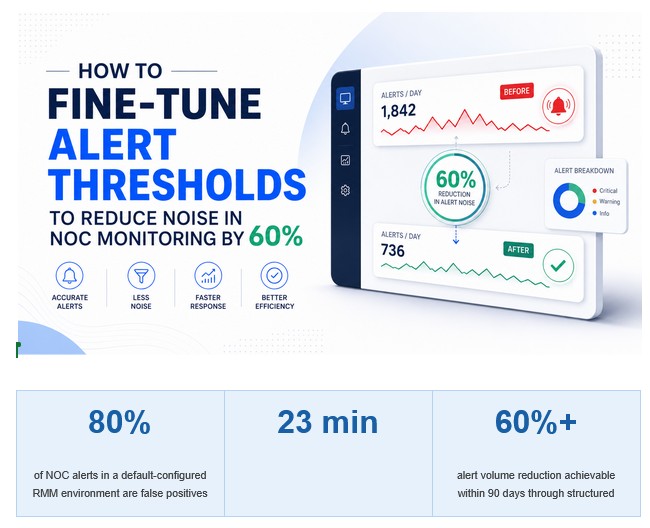
The good news is that alert noise is an engineering problem with an engineering solution. A structured, methodical approach to alert threshold tuning consistently delivers 50 to 70% reductions in alert volume within 60 to 90 days — without any increase in missed genuine incidents, and in most cases with a measurable improvement in detection rates for the alerts that actually matter. This article is a practical guide to that methodology.
Understanding the Anatomy of Alert Noise
Before tuning anything, you need a clear taxonomy of what alert noise actually is. Not all noise has the same cause, and not all of it is addressed by the same remediation approach. There are four distinct categories of alert noise, and a complete tuning program addresses all four.
The first category is threshold miscalibration. This is the most common form of noise and the most straightforward to address. A disk space alert set to trigger at 80% utilization is generating noise on a 2TB file server that routinely runs at 82% because it has never needed to operate below that level. The same threshold on a 50GB system partition where 80% utilization signals imminent failure is appropriate. The threshold is not wrong in principle; it is wrong for the specific system and environment it is applied to.
The second category is transient condition alerts. These are alerts that fire on conditions that self-resolve within a predictable timeframe without intervention. CPU spikes during scheduled backup windows, memory utilization peaks during application startup sequences, network latency spikes during large file transfers — these are conditions that look like incidents if you see a single data point and look like normal operational patterns if you see them in context. Alerts that fire on transient conditions without a persistence filter are generating noise by design.
The third category is duplicate coverage. Many RMM environments have multiple monitoring rules covering the same underlying condition — a server that is unreachable might generate an agent offline alert, a ping failure alert, a service monitor timeout, and an SNMP trap simultaneously. All four alerts represent the same root cause. Resolving the connectivity issue closes all four, but the NOC engineer who acknowledged and investigated all four spent three times more effort than the incident required.
The fourth category is low-value informational alerts. These are conditions that may be technically relevant but do not require human action or investigation. Windows Event Log warnings that are generated by normal application behavior, scheduled task completion notifications, automatic Windows Update installation confirmations — these are informational signals that belong in a log aggregation system for audit purposes, not in an engineer’s alert queue.
“Alert noise is not a volume problem. It is a precision problem. A well-tuned NOC environment generates fewer alerts, each of which has a higher probability of representing a genuine condition that requires human attention. Precision, not volume, is the engineering target.”
Phase 1: Baselining — The Data Before the Tuning
Alert tuning without a performance baseline is guesswork. Before changing any threshold, you need quantitative data on the current alert environment that allows you to measure the impact of your tuning decisions objectively. This baselining phase typically runs for two to four weeks and collects the following data sets.
Alert volume by category and client is the first data set. You need to know not just the total alert volume, but which alert types and which client environments are driving the most noise. In most MSP environments, 20% of alert categories account for 80% of alert volume — the Pareto distribution is remarkably consistent. Identifying those high-volume categories early allows you to prioritize tuning effort where it will have the greatest impact.
False positive rate by alert category is the second critical data set. For each alert type, track what percentage of fired alerts result in a genuine remediation action versus being closed as “no action required” or “self-resolved.” An alert category with a false positive rate above 70% is a tuning priority. An alert category with a false positive rate above 90% is a candidate for suppression or complete reconfiguration.
Alert-to-incident conversion rate is the inverse metric that tells you how well the current configuration is detecting genuine issues. Of the genuine incidents that occurred during the baselining period, what percentage were first detected by an RMM alert versus being reported by the client or discovered through other means? A low alert-to-incident conversion rate indicates that the noise is not just wasting engineer time — it may also be burying genuine signals.
Time-of-day and day-of-week alert distribution patterns reveal which alert spikes correlate with scheduled operational activities — backup windows, batch processing jobs, scheduled maintenance tasks — versus genuine operational conditions. This distribution data is essential for designing persistence filters and maintenance window suppressions.
Phase 2: Threshold Engineering by Alert Category
With baseline data in hand, the tuning work begins category by category, starting with the highest-volume, highest-false-positive categories identified in the baseline analysis. Here is how the engineering logic applies across the most common problem categories.
Disk Space Alerts
Default disk space alerts at a fixed percentage threshold are almost always wrong for at least a subset of monitored systems. The correct engineering approach sets thresholds based on available free space in absolute terms, not percentage, for drives where the total volume is large. A 10% threshold on a 4TB drive means 400GB of remaining space — which is not urgent for most workloads. The same 10% on a 100GB system drive means 10GB remaining — which is immediately actionable.
For each monitored drive, define the threshold based on a combination of absolute free space floor (e.g., alert when less than 15GB remains on system partitions), rate-of-change analysis (alert when disk consumption is accelerating beyond normal growth patterns rather than at a static threshold), and operational context (database servers, log servers, and backup destinations warrant different thresholds than standard workstations).
CPU and Memory Utilization Alerts
CPU and memory alerts are among the highest-noise categories in most NOC environments because instantaneous utilization metrics are nearly meaningless for most server workloads. A SQL server that hits 95% CPU utilization for 45 seconds during a scheduled report generation job is operating normally. The same server sustained at 90% CPU for 20 minutes with no scheduled job running is a genuine performance incident.
The engineering fix is a persistence filter: the alert fires only when the threshold is breached continuously for a defined time window. A five-minute persistence window eliminates the vast majority of transient CPU and memory spikes while preserving detection of sustained performance degradation. The persistence window should be calibrated per system type — workstations may warrant a shorter window than servers, and batch processing servers may warrant a longer window than general-purpose servers.
Service and Process Monitor Alerts
Service monitor alerts generate significant noise when services are configured to auto-restart on failure — which is the case for most Windows services. A service that stops, auto-restarts in under 30 seconds, and resumes normal operation has self-healed. Alerting on that condition without a persistence or recurrence filter produces noise: the engineer acknowledges the alert, confirms the service is running, closes the ticket, and has accomplished nothing that the auto-restart did not already accomplish.
The correct configuration for service monitors alerts on persistent failure (service has been down for more than a defined time window despite restart attempts) or recurrent failure (service has restarted more than a defined number of times within a rolling window). Both conditions warrant investigation. A single auto-recovered service restart does not.
Windows Event Log Alerts
Windows Event Log monitoring is simultaneously one of the most valuable and most noise-prone monitoring capabilities in the RMM toolstack. The Windows Event Log generates thousands of events per day on a normal, healthy system — the vast majority of which are informational or expected warnings generated by normal application behavior.
Effective Event Log alert configuration requires an inclusion approach rather than an exclusion approach. Rather than alerting on all errors and warnings and then trying to filter out the noise, define the specific Event IDs that are known to represent genuine problems requiring investigation — hardware failures, critical application errors, security events, disk errors — and alert only on those. For each client environment, the list of alertable Event IDs should be reviewed against the actual application stack running in that environment, since Event IDs that are noise in one environment are genuine signals in another.
Phase 3: Maintenance Windows and Scheduled Suppression
A significant proportion of alert noise in most NOC environments is generated by scheduled operational activities — backup jobs, patch deployment windows, scheduled reboots, batch processing runs, and database maintenance operations. These activities produce predictable alert patterns: CPU spikes, disk I/O saturation, service restarts, network utilization peaks, and temporary agent offline conditions during reboots.
Maintenance window suppression is the mechanism that eliminates this category of noise. For every client environment, define the recurring operational windows during which specific alert categories should be suppressed. Backup window suppression covers the hours during which backup jobs run, eliminating the CPU, disk, and network alerts that backup activity generates. Patch window suppression covers scheduled patching periods, eliminating the reboot alerts and service restart notifications that patch deployment generates.
Maintenance window configuration requires accurate knowledge of each client’s operational schedule, which is part of the environment documentation that should be maintained in your documentation platform and referenced during the RMM onboarding process for each client. Suppression windows should be reviewed quarterly to ensure they remain aligned with client operational changes — backup schedules change, patch windows shift, and a suppression window that is no longer aligned with the actual operational schedule becomes a detection gap rather than a noise reduction tool.
Phase 4: Alert Correlation and Deduplication
Alert correlation is the practice of linking multiple alerts that share a common root cause into a single incident record, reducing the apparent alert volume and ensuring that NOC engineers are investigating incidents rather than individual alerts. This is particularly important for infrastructure failure scenarios where a single underlying issue — a network switch going offline, a domain controller becoming unresponsive, a SAN losing connectivity — can trigger dozens of downstream alerts across multiple monitored systems.
Effective alert correlation requires understanding the dependency relationships within each client environment. When a network device goes offline, which monitored systems will generate secondary alerts as a result? When a DNS server becomes unresponsive, which downstream service monitor alerts will follow? These dependency maps should be documented for each client’s critical infrastructure components, allowing the NOC team to recognize correlated alert storms as a single infrastructure event rather than multiple independent incidents.
At the platform level, most modern RMM and ITSM tools support alert grouping and parent-child ticket relationships that operationalize correlation. When a network outage generates 40 alerts across 40 systems, the correct operational response is one parent ticket for the network outage and 40 child tickets for the affected systems — not 40 independent investigations. Configuring this correctly reduces both the volume of engineer work and the complexity of the incident record.
“In a well-tuned NOC environment, an engineer reviewing their alert queue should be able to identify the three or four genuine issues requiring attention in the next hour within 90 seconds of opening the console. If that mental triage takes longer, the tuning work is not done.”
Phase 5: Continuous Tuning and the Feedback Loop
Alert threshold tuning is not a project with a completion date. It is an ongoing operational discipline that requires a structured feedback loop between the engineers who are working the alert queue and the engineering team responsible for RMM configuration. Without this feedback loop, tuning improvements degrade over time as client environments change, new systems are onboarded, and alert configurations that were correct six months ago become miscalibrated.
The feedback loop has three structural components. The first is a standardized false positive reporting mechanism that allows NOC engineers to flag specific alerts as noise in real time, with enough contextual information to drive a tuning decision. The flag should capture the alert type, the specific system, the condition that triggered the alert, and the engineer’s assessment of why it is not actionable. This information flows to the RMM configuration team for weekly review.
The second component is a missed detection review process. When a genuine incident occurs that was not first detected by an RMM alert — when the client reported it before the NOC saw it — that is a detection gap that needs to be investigated and addressed. The review asks: should there have been an alert for this condition? If so, why did it not fire? Was it suppressed, misconfigured, or simply not monitored? The answer informs a configuration change that closes the detection gap.
The third component is a monthly alert performance report that tracks the key metrics from the baseline phase on an ongoing basis: alert volume by category, false positive rate by category, alert-to-incident conversion rate, and any new noise categories that have emerged since the last review. This report is the management-level view that keeps tuning progress visible and sustains the organizational commitment to ongoing optimization.
The Operational Outcome: What 60% Noise Reduction Actually Delivers
The 60% alert volume reduction that structured threshold tuning delivers is not an end in itself. It is a means to several specific operational outcomes that have direct impact on NOC performance, client experience, and MSP profitability.
Engineer capacity recovery is the most immediate operational benefit. An engineer who was previously spending a significant portion of each shift processing noise alerts now has that time available for genuine incident investigation, proactive monitoring, runbook development, and client environment review. In a four-engineer NOC team, recapturing 90 minutes of productive capacity per engineer per shift translates into six engineer-hours per day of additional productive capacity — without adding headcount.
Genuine incident detection quality improves measurably. Engineers who trust that their alert queue contains a high proportion of real, actionable signals engage with it differently than engineers who have learned to filter noise mentally. Response times for genuine incidents improve because the genuine alerts are not buried in noise. Detection rates improve because engineers are more attentive to an alert queue that consistently rewards their attention.
Client-facing outcomes improve as a downstream consequence. Fewer missed incidents mean fewer client-reported issues that should have been caught proactively. Faster genuine incident response means shorter client-facing mean time to resolution. Cleaner alert-to-ticket data means more accurate and impressive operational reporting at QBRs. The tuning investment pays dividends at every layer of the service delivery stack.
For MSPs using a white-label NOC partner like TechMonarch, alert threshold tuning is a core deliverable of the engagement, not an optional optimization. The quality of a NOC operation is fundamentally limited by the quality of the signal environment it is operating in. Getting that signal environment right through disciplined, ongoing threshold engineering is the foundational work that makes everything else the NOC delivers more effective, more reliable, and more valuable to the clients who depend on it.